
Last Updated: September 2026
The best Fortnite keybinds are not a famous player's layout copied key for key. They are the binds you can hit under pressure without dropping movement, twisting your hand, or thinking about which finger owns the next action.
This guide is current for Fortnite v42.20. Epic's official v42.20 release notes{:target="_blank"} date that release to September 17, 2026. The weapon pool and map will change, but the input problem stays the same: move, aim, build, edit, reset, swap, and communicate without one finger doing everything.
⚡ Quick answer: Keep WASD free, split frequent build actions across both hands, put edit on a clean index-finger reach, avoid conflicts, and change one bind at a time. Test each change in Creative and three live matches before keeping it.
Table of Contents
- Start with a reach audit
- Build a balanced keyboard layout
- Choose edit and reset binds
- Place weapons and utility
- Migrate without wrecking muscle memory
- Run the seven-day test
- Practice with a teammate
- Fix common mistakes
- Read the FAQ
Fortnite Keybinds: Start With a Reach Audit
Open Fortnite, then open Settings → Keyboard Controls. Epic's control support guide{:target="_blank"} confirms that mouse-and-keyboard controls live under the arrow-keys tab. Take screenshots before changing anything.
Now put your hand on WASD and test every important action without looking down. Do not judge speed yet. Judge what your hand has to sacrifice.
- If pressing a build bind pulls a finger off A or D, note the lost strafe.
- If edit and reload fight for the same comfortable key, decide which action needs the cleaner reach.
- If two high-frequency actions use the same finger back to back, move one to the mouse or thumb.
- If a bind causes hand tension within a few minutes, it is not a long-session bind.
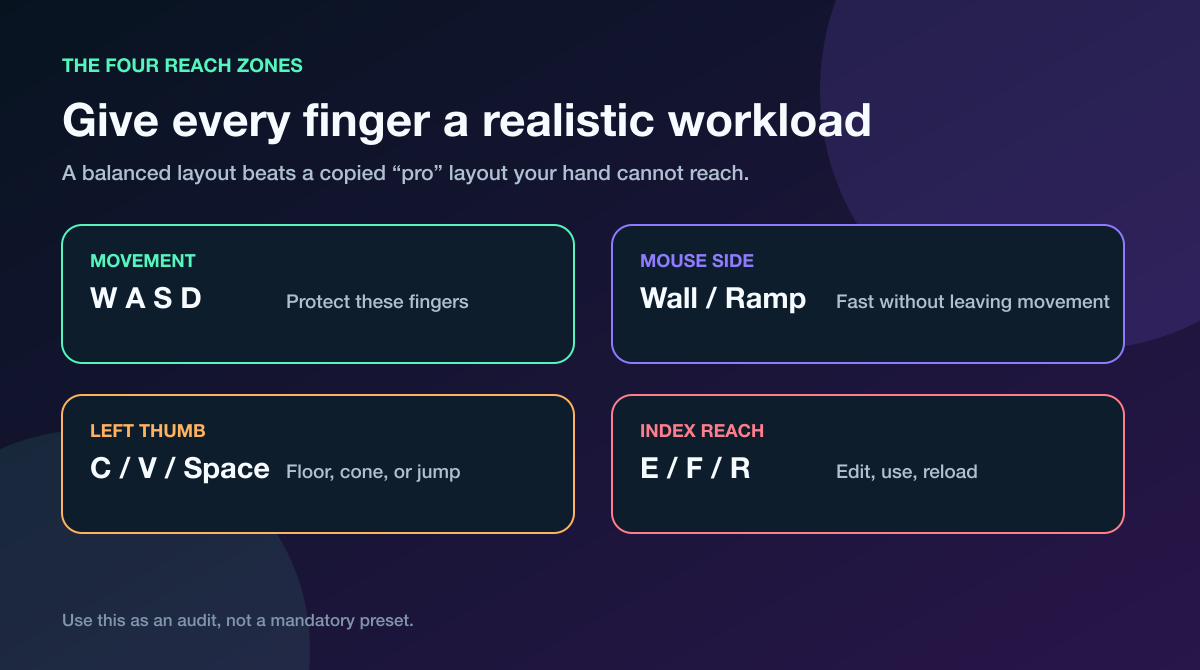
Use the zones as an audit. Your keyboard size, mouse buttons, hand size, and posture decide the final layout.
I believe comfort is a competitive setting. A bind that feels fast for five minutes but hurts after an hour is not optimized; it is borrowed time.
A consistent teammate makes this audit sharper. Have them repeat the same wall spray, side switch, and close peek while you test one bind; pressure exposes the moment a “comfortable” layout steals movement or delays the weapon swap.
Best Fortnite Keybinds: A Balanced Starting Layout
There is no universal best list, but there is a useful starting structure. Keep movement on WASD, jump on Space, and distribute the four build pieces so one hand does not carry every rapid input.
| Action | Starting area | What to protect |
|---|---|---|
| Wall | Mouse Button 4 or a close keyboard key | Movement during first cover placement |
| Ramp | Mouse Button 5 or another close key | Forward movement while building |
| Floor | C or V | Thumb access without leaving WASD |
| Cone / Roof | Left Shift, X, or V | A separate finger from edit |
| Edit | E or F | Repeatable index-finger tap |
| Reset | Mouse wheel or an easy keyboard key | No conflict with crouch, use, or weapon swap |
| Crouch | Left Ctrl or another comfortable pinky key | Clean movement during peeks |
| Sprint | A low-conflict key or preferred toggle setup | No collision with building or crouch |
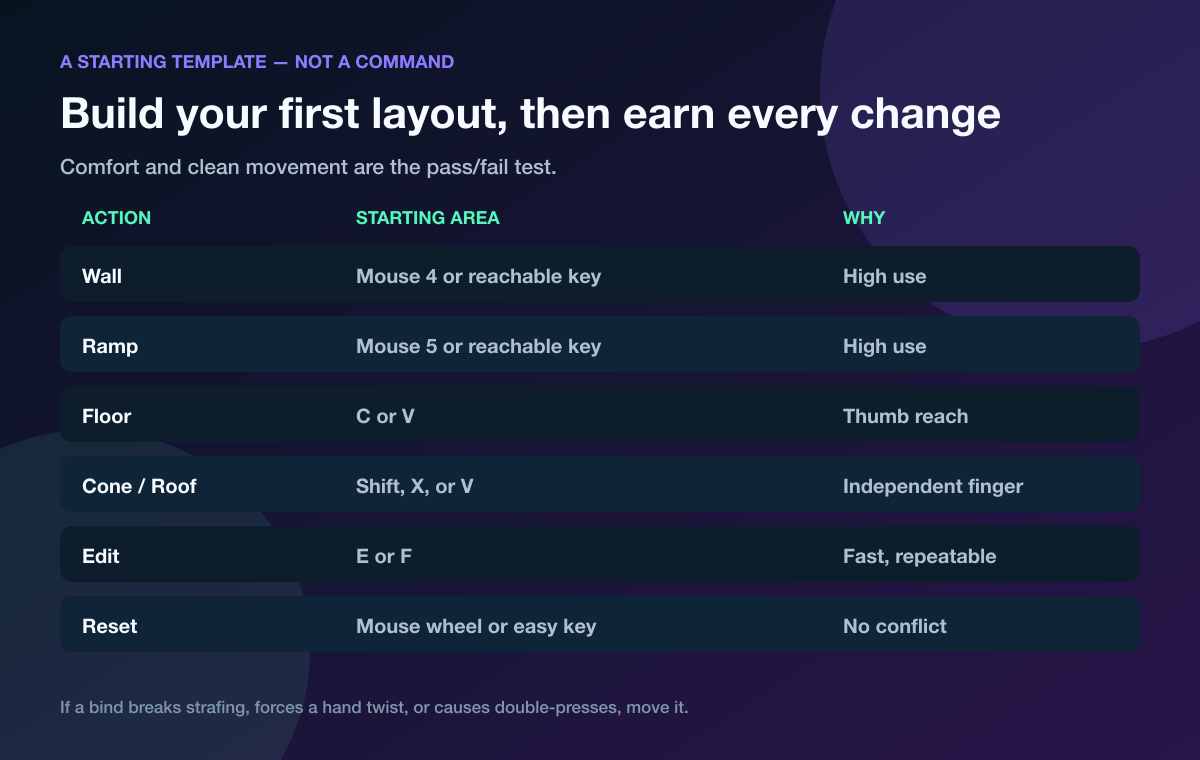
A starting template narrows the search. It does not know what your hand can reach.
Mouse side buttons are useful because your movement fingers stay planted. They can also disturb aim if you squeeze the mouse to press them, so test wall and ramp placements while tracking a moving target.
Thumb binds like C and V work only if your thumb can press them without losing Space. If you keep missing jump after moving a build piece there, the bind failed the movement test.
What about pro Fortnite keybinds?
Use a pro layout to discover possibilities, not to skip testing. Two elite players can use completely different wall, floor, ramp, cone, and edit binds because their hardware, grip, habits, and hand reach are different.
The useful question is not “Who uses this?” It is “Can I hit it while holding W and changing direction?”
Fortnite Edit Binds: Edit, Confirm, and Reset
Your edit bind needs three qualities: easy reach, low hand movement, and a clean return to combat. E and F are common starting areas because the index finger can reach them quickly, but either key can clash with use, reload, or another action you already trust.
Fortnite exposes edit, select, confirm, and reset behavior in its keyboard settings. Test the exact sequence you use rather than copying a label from an old settings video.
Run these three reps slowly:
- Open a wall edit, take a right-side peek, and close it.
- Edit a floor and cone while moving forward, then swap to your weapon.
- Reset a wall after firing without crouching, reloading, or selecting the wrong slot.
If one input triggers two actions, fix the conflict before practicing speed. Epic documents the same principle on controller: its build-reset support note{:target="_blank"} tells players to separate crouch and confirm/reset when a shared button causes the wrong action.
⚠️ Watch out: Scroll-wheel reset can be convenient, but do not bind it blindly. Make sure the same wheel direction is not also changing weapons or interacting when you need a reset.
Pair the input work with our Fortnite box fights guide. A bind proves itself when you can edit, shoot, close, and move while somebody is shooting back.
Fortnite Keyboard Settings for Weapons and Utility
Weapon slots should support the decisions you make most often. Keep your primary close-range weapon on a key you can hit immediately after an edit. Put the follow-up weapon or spray option beside it, then place heals and utility in the remaining slots.
A simple audit:
- Can you move from edit to shotgun without looking down?
- Can you swap to the follow-up weapon without lifting off W?
- Can you reach heals without pressing a build bind by mistake?
- Can you reload, interact, ping, and open inventory without crowding combat inputs?
Do not change every weapon slot because somebody else's numbered row looks cleaner. If 2-3-4-5-6 already works, keep it until your scorecard shows a real miss.
Your keybinds also depend on performance. A stutter can feel like a missed input, and a missed input can look like a frame problem. Lock your renderer and frame cap with the Fortnite Performance Mode guide before blaming the keyboard.
Change Fortnite Keybinds Without Wrecking Muscle Memory
Changing 12 binds at once creates 12 suspects after the first bad fight. Change one high-value action, test it, then move to the next.
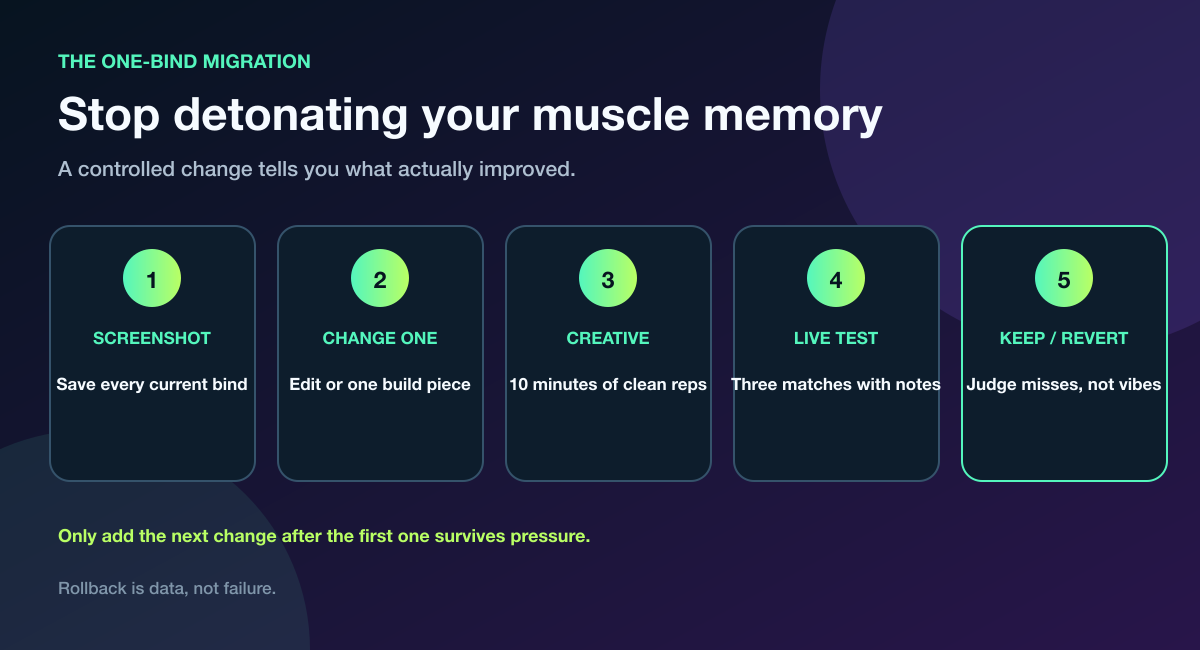
One changed bind gives you one clean answer.
Use this migration:
- Save the old layout. Screenshot every keyboard and mouse page.
- Choose one bind. Start with the action that causes the most obvious miss.
- Run 10 minutes in Creative. Move, build, edit, reset, and swap at controlled speed.
- Play three live matches. Record accidental presses, hesitation, and movement breaks.
- Keep or revert. Keep the bind only if mistakes fall without new hand tension.
Do not add the second change because the first felt exciting in freebuild. Add it after the first survives a fight.
Test Your Fortnite Keybinds for Seven Days
The first day measures unfamiliarity. The next six tell you whether the layout is actually learning-friendly.
Use the same short warm-up every day:
- Two minutes: movement plus single-piece placements
- Three minutes: wall edits, resets, and weapon swaps
- Three minutes: floor-and-cone sequences while changing direction
- Two minutes: one live box-fight or target-pressure drill
Then record five things. Numbers can be simple; consistency matters more than precision.
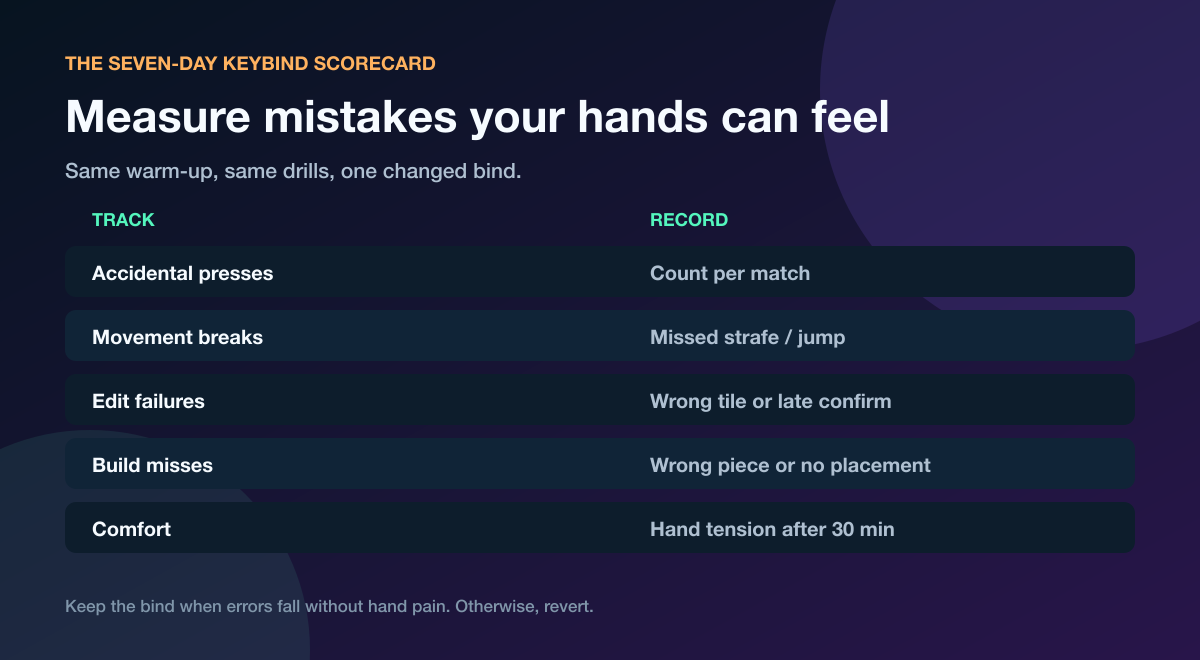
Keep the same drill. If the test changes every day, the score cannot explain the bind.
Track accidental presses, broken movement, failed edits, missed build pieces, and hand tension after 30 minutes. A new bind should trend toward fewer errors without creating pain somewhere else.
Use the 20-minute Fortnite aim training routine after the keybind warm-up. That separates “I cannot reach the weapon slot” from “my crosshair was not ready.”
Test Keybinds With a Teammate Under Pressure
Freebuild lets you choose the timing. A teammate does not.
Ask a partner to repeat four situations:
- Spray your wall while you build and move.
- Hold a close angle while you edit, shoot, and reset.
- Force you to swap from build mode to shotgun.
- Change sides so both A- and D-direction movement get tested.
Use one call after each failed rep: wrong bind, late bind, or wrong decision. That keeps keyboard mistakes separate from game-sense mistakes.
If you do not have a consistent practice partner, test your Fortnite keybinds with a teammate or coach on Tapin. Bring the old layout screenshot and the seven-day scorecard so the session has evidence, not vibes.
Six Fortnite Keybind Mistakes
1. Copying a full pro layout overnight
You inherit the player's habits without their practice history. Copy one idea and test it against your own movement.
2. Loading every build piece onto the keyboard hand
That hand already owns movement, editing, and many weapon slots. Move one or two high-use pieces to mouse buttons if you can press them without disturbing aim.
3. Ignoring duplicate actions
One key can create a clean shortcut or a brutal conflict. Test reset, crouch, interact, reload, and weapon cycling in the same drill.
4. Testing only in freebuild
Rehearsed sequences hide hesitation. Add a moving target, incoming pressure, and an immediate weapon swap.
5. Changing sensitivity at the same time
Now every miss has two possible causes. Lock sensitivity while testing binds.
6. Keeping a painful bind because it looks fast
Hand tension is a failed result. Move the bind, adjust the keyboard angle, or return to the old layout.
Fortnite Keybinds FAQ
What are the best Fortnite keybinds for beginners?
Start with WASD for movement, Space for jump, one or two build pieces on mouse side buttons, floor or cone on a thumb-reachable key, and edit on E or F. Keep the default weapon row if it already feels reliable, then change one problem bind at a time.
Should I copy a pro player's Fortnite keybinds?
Copy ideas, not the whole layout. A pro setup can show useful ways to split build pieces across both hands, but your hand size, keyboard angle, mouse grip, and existing muscle memory decide whether those binds work.
Is E or F better for editing in Fortnite?
Use the key you can tap repeatedly without losing movement or colliding with use, reload, or a build piece. Test both with the same wall-edit, reset, and weapon-swap sequence.
Should I use mouse buttons for Fortnite builds?
Mouse buttons can keep movement fingers on WASD, which makes them useful for high-frequency pieces like wall and ramp. Skip them if pressing the button changes your grip or pulls your crosshair off target.
How long does it take to learn new Fortnite keybinds?
Do not judge from one freebuild session. Run a seven-day test with the same warm-up and live-pressure reps, then compare accidental presses, movement breaks, edit failures, build misses, and comfort.
Build the Layout Your Hands Can Trust
Good Fortnite keybinds make the next action boring: your finger goes there, the input happens, and your attention stays on the fight. Protect movement, spread the workload, change one bind at a time, and keep only what survives seven days of pressure.
The goal is not to own the most “optimal” screenshot. It is to stop thinking about the keyboard.